
While exploring in Banff National Park, you’ll be in awe of the beauty of this area. The rugged mountains, clear blue lakes and wildlife are what keeps people coming back year after year. You’re going to love exploring this region of Canada. Before you arrive, you can be even more prepared by downloading our top recommended apps for visiting Banff National Park.
In Banff, the most useful tools are the ones that help you navigate offline, check official trail and road conditions, manage parking, and make your trip smoother once cell service gets spotty..
Whether you are visiting Banff in summer or winter, I’ve listed the apps that we as locals use on a regular basis. These travel apps for Banff will help you navigate the park and also leave you with even more knowledge about the area!
While most of these are apps you can download before your trip, I’ve also included a few helpful Banff websites that are worth bookmarking before you arrive.

This post contains compensated links.
Best Apps for Travel to Banff National Park
The best apps for visiting Banff National Park are the ones that help with offline navigation, trail planning, parking, transit, road conditions, weather and safety. Here are my recommendations for apps you should get before coming to Banff.
1. Google Maps
Google Maps is probably the most obvious app to have on your phone before visiting Banff, but it’s still worth mentioning because cell service can be spotty once you leave town. Before your trip, download offline maps for Banff, Canmore, Lake Louise, Yoho National Park and the Icefields Parkway so you can still navigate even when you lose service.
I use Google Maps for driving directions, checking distances between stops and saving places I want to visit. It’s especially helpful if you’re trying to plan a realistic Banff itinerary and want to understand how far apart everything actually is.
Just keep in mind that Google Maps doesn’t always know about seasonal road closures, shuttle-only access or full parking lots. For places like Moraine Lake, Lake Louise, Johnston Canyon and the Icefields Parkway, use Google Maps for basic navigation, but always double-check current access, parking and shuttle information before you go.
If you are unfamiliar with the shuttle system in Banff, we highly recommend you read our guides to How to Get to Lake Louise and How to Get to Moraine Lake as soon as possible.
2. GuideAlong App
You’re going to be spending time in your car while driving on some of the most scenic roads in Banff National Park. We highly recommend the series of GuideAlong Audio Tours for the Canadian Rockies.

This app allows you to delve into the region’s history and hidden gems, enriching your drive with fascinating insights. Once downloaded, it uses GPS offline, so you’ll hear about different areas as you drive and get alerts for upcoming places you may want to stop.
Even as locals, we really enjoyed using the GuideAlong app as we drove from Banff to Lake Louise, on the Bow Valley Parkway and along the Icefields Parkway. We were thoroughly impressed with the information and feel it’s well worth the small price for how much it can enhance a visitor’s experience in Banff.

Recommended App
This GPS activated Canadian Rockies Audio Driving Tour is the perfect companion to your Banff vacation. It’s both entertaining and educational and will greatly enhance any drive in Banff National Park. Get 15% off with our Banff Discounts.
3. AllTrails
I recommend AllTrails to you based on my years of experience using it at home in Banff and in my travels around the world. You can see by this screenshot of my recorded AllTrails activities, I’ve logged over 500 activities in Banff National Park!
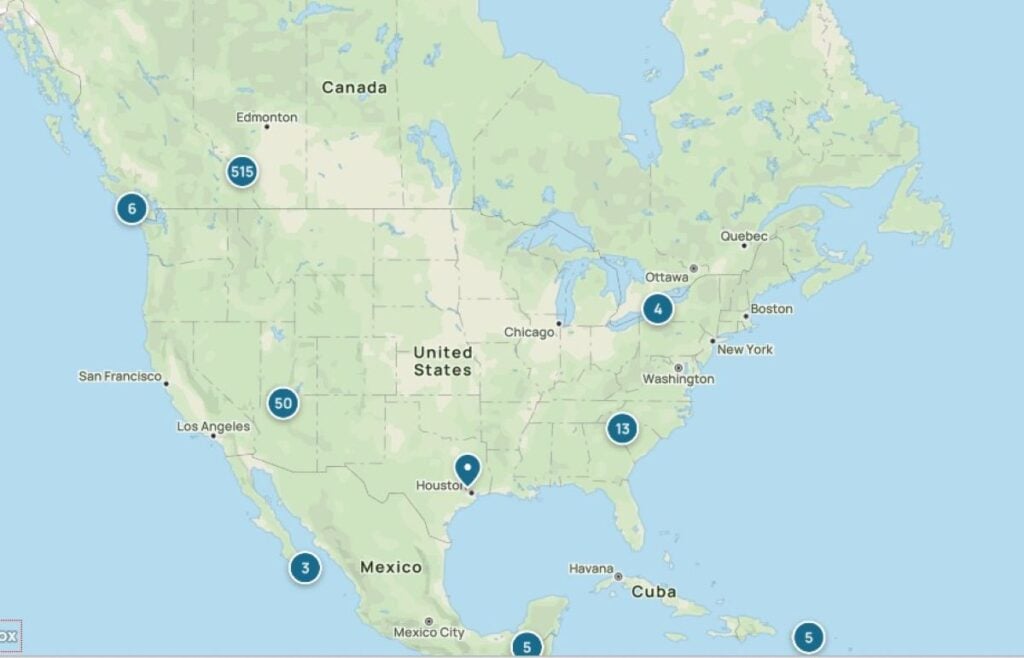
AllTrails is a must-have app for anyone exploring Banff’s best hiking trails. It offers detailed maps and reviews from a community of hikers, helping you choose hiking trails trails that match your skill level and preferences.

Since you can’t always count on cell service around Banff, you’ll definitely want the offline map feature. I especially like that you can download all the hiking trails for Banff at once, so you’ll be sure to have the right map on your phone.
If you want offline map downloads, a Banff trip is the perfect time to try AllTrails Plus. Sign up for the 7-day free trial before you arrive, download the trail maps you need, and you’ll be much better prepared when cell service disappears.
One of the most useful features of AllTrails is the real-time location tracking. Knowing your real-time position is useful for staying on the right trail or finding your way back to the trail if you take a wrong turn.
One caution about using AllTrails: when you are tracking your hike it can be hard on your phone battery. If you are going on a multi-hour hike, we recommend carrying a power bank.
Prefer a Paper Map?
We understand! We love looking through our Gem Trek maps not only for inspiration but to help us plan hiking routes! These waterproof, durable maps are our favourite!

4. Parks Canada Trail Conditions (Website)
While we’re talking about hiking, one of our most important Banff hiking tips is to check trail conditions and for any closures before you head out. You won’t find this information on AllTrails, so bookmark the Parks Canada Trail Conditions page and check it every time before you hit the trails.
5. Schnerp.com (Website)
Ok, this one isn’t an app, but it’s a Banff website that should be on your radar. Schnerp is a campground reservation monitoring services specific to Canada. When campsites are full on your desired dates, you can use Schnerp to continually monitor the campsite reservation systems for you. It works with the Parks Canada system, Alberta Parks, BC Parks, Ontario Parks and even Parks Canada shuttles.

For example, if you weren’t successful getting a shuttle to Lake O’Hara, this is a good option to be notified of any shuttle openings! Similarly, if you didn’t get the campground you were hoping for, you can put in a request to monitor for any openings. You can also use it for the Moraine Lake shuttle!
I’ve been using Schnerp to get shuttle and campsite reservations that I missed out on. I love that I get notified the instant my dates become available. This is so helpful as I inevitably end up forgetting to check for the openings myself!
6. Travel Banff Canada Mobile Itineraries
While these aren’t an app, you will use them on your mobile phone. Our carefully crafted Pre-Built Banff Itineraries are mobile friendly and allow you to see your fully planned days right on your phone.
You can use our multi-day itineraries for booking and even to navigate, as they include links to the best activities in the park and custom Google Maps with all the points of interest.
Our Banff mobile itineraries are included as part of our Banff Planning Hub. One purchase gives you access to the Banff Travel Guide, all itineraries, printable versions, and live seasonal Q&A support inside the Banff & Jasper Planning Hub.

7. PeakFinder
You can think of PeakFinder as your mountain encyclopedia. If you are like us and want to know which mountain peak you are looking at, this app will do exactly that! Even as locals, there are some mountain peak names we are still learning and sometimes it’s hard to know which peak you are looking at when you see it from a different perspective.

This app identifies over 1,000,000 peaks worldwide, so you’ll use it again and again. Just point your phone at the mountain peaks to learn which mountains are which.
What’s more, its offline functionality means you can access this information even in remote areas. It’s an excellent resource for enhancing your understanding of Banff’s majestic mountain landscapes.

8. OpenTable
If you are visiting during peak summer season in Banff, you may wish to make advance reservations for your restaurants. OpenTable simplifies the process of booking your Banff dining experiences.
The OpenTable app’s user-friendly interface allows for quick reservations, ensuring you can enjoy Banff’s diverse culinary scene without the hassle of last-minute searching.
9. Transit App
If you’re planning to use Roam Transit during your Banff trip, the Transit app is the one you’ll want to download. It helps with route planning, schedules, live bus locations and fare purchasing, which makes it one of the most useful apps for visiting Banff without a car.
This is especially helpful if you’re using Roam to travel between Banff, Canmore or Lake Louise, or if you’re trying to time your day around shuttles, hikes or dinner reservations.
Roam also supports the Token Transit app for mobile fare purchases, but for most visitors, I’d start with the Transit app because it includes more of what you need in one place. If you do use Token Transit, make sure you have cell service or data when purchasing and activating your pass.
10. Blinkay Smart Park (Banff Parking)
The Blinkay smart parking app can be used to pay for parking in the town of Banff. You pay with your credit card and can top-up your time on the app at any time. You just need to enter your licence plate number.
If you don’t want another app on your phone, you can also use the Blinkay website to pay for parking in Banff or one of the pay stations. In the Banff townsite, there’s only one public pay zone for all of downtown parking. Paid parking in the town of Banff is $12/hour May through October and $7/hour in the non-peak season.
If you are driving to Banff, check out our post on finding free parking in Banff. If you want to check where you can find available parking spots in Banff, visit the BanffNow site.
11. Pay By Phone (Canmore Parking)
In Canmore, you can use the Pay By Phone app to pay for parking in the downtown zone or at Quarry Lake. Parking in the Canmore downtown area will cost $5 per hour from mid-May to mid-October. In the offseason it’s $2.00 per hour on weekdays and $3.00 on weekends and holidays.
If you wish to visit the beautiful Quarry Lake in Canmore, paid parking is $20 for 2-hour increments in peak season (mid-May to mid-October) and $2.50/hr in the non-peak season.
12. Trailforks
If you mountain bike, you may already know Trailforks is an essential app. It provides detailed, up-to-date trail information and maps, contributed by a community of cyclists.
The app not only helps in finding the best routes but also in tracking your rides, making it easier to navigate and enjoy Banff’s biking trails.

13. My Aurora Forecast
While there’s no guarantee that you’ll get to see the Northern Lights while visiting Banff, it is possible, especially in the winter months.
The Aurora app predicts the visibility of the northern lights, providing alerts and photography tips. It’s an essential Banff app for anyone hoping to experience and capture the awe-inspiring beauty of the Aurora Borealis in Banff.
My Aurora Forecast is available on iOS and Google Play.
14. Weather App
This one is pretty obvious, but it’s worthwhile to have your favourite weather app loaded with Banff’s local forecast. While the weather can be unpredictable, you should still be checking it to help you prepare for the day.
15. Airalo ESIMs
If your regular cell plan doesn’t have a good roaming option for Canada, you can buy an eSIM to use during your trip. We travel frequently and since we don’t love our roaming options, we always buy eSIMs from Airalo.
We’ve used Airalo eSIMs in several countries around the world, including South Korea, Panama, the United States and throughout Europe.
16. SkiBig3 App
If you plan on visiting Banff National Park in the winter, the SkiBig3 app will give you maps, ski shuttle schedules, weather conditions and webcam images for all three ski resorts. It’s especially helpful if this is your first time skiing in Banff.
If you plan on skiing or snowboarding exclusively at Sunshine Village, they have their own Sunshine Village Banff app.

17. Nordic Pulse
If cross-country skiing is more your style, the Nordic Pulse app is what we use to check grooming reports for anything outside of the national park.
Parks Canada displays their grooming information in the trail conditions here, but for any cross-country skiing in Canmore at the Nordic Centre or in Kananaskis then we use Nordic Pulse.

18. 511 Alberta
You should always check road conditions before heading out in the winter. 511 Alberta provides real-time highway conditions, construction, incidents and other travel information across Alberta. You can either download the app or just visit the website.
19. FireSmoke Canada (Website)
FireSmoke Canada is a helpful tool to have during wildfire season, especially if smoke conditions could affect your hiking plans or mountain views. It provides smoke forecasts across Canada, so you can get a better sense of whether wildfire smoke may impact your time in Banff, Canmore, Lake Louise or along the Icefields Parkway.
20. Avalanche Canada (Website)
If you’re visiting Banff in winter, Avalanche Canada is one of the most important resources to check before heading out. It provides current avalanche forecasts, danger ratings and mountain safety information, which is especially useful if you’re skiing, snowshoeing, hiking or travelling beyond maintained areas.

Let me Help with Your Banff Itinerary?
We have a suite of Banff Travel Planning services that can take all the guesswork out of planning your trip! Book a 1 hour travel consultation or let me create a custom Banff Itinerary for you!
Support Human Created Content

Hi, we’re Dan & Celine Brewer, locals from just outside Banff National Park. Every article, itinerary, and recommendation we share is rooted in our real experiences and love for this place. If you’ve found our content helpful, please consider supporting us:
- Make a small donation: Your support directly fuels our work and keeps our stories genuine.
- Purchase a guide or itinerary: Essential tools that help plan your trip and support local creators at the same time.
- Book lodging or tours through our affiliate links: You pay the same price, but we earn a small commission that helps us keep producing content.
Thank you for valuing authentic, human-created content. Your support allows us to help even more Banff travellers!

Celine Brewer, a local Canmore resident, is the co-owner of Travel Banff Canada. She has a passion for being out in the mountains any time of year. In the summer, you'll often find her hiking or mountain biking. In the winter, she enjoys cross-country skiing, snowshoeing and winter hiking the most.
As much as she loves the mountains, she also loves travel! When she's not playing outdoors at home, she's either traveling the world with her husband and two kids or working on their other two travel sites: Family Can Travel and Baby Can Travel.